
SwimTopia
Team Topia Inc.Sports
4.3187.00 Reviews
- Version
- 7.2.0
- Installs
- 100.00K
- Age Rating
- Everyone
Screenshots
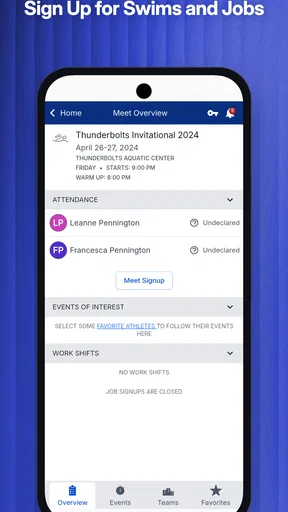
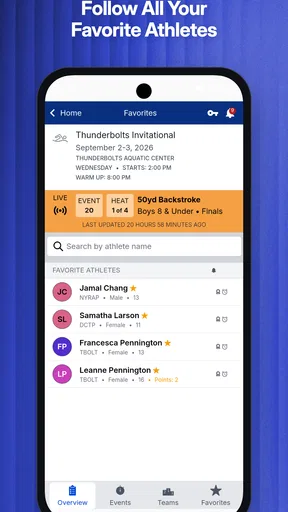
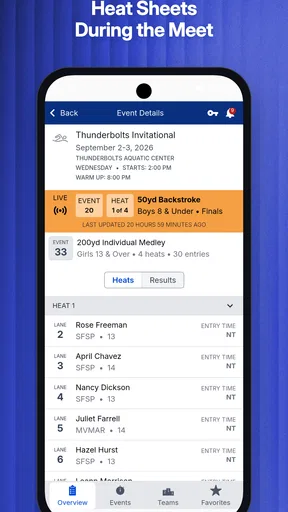
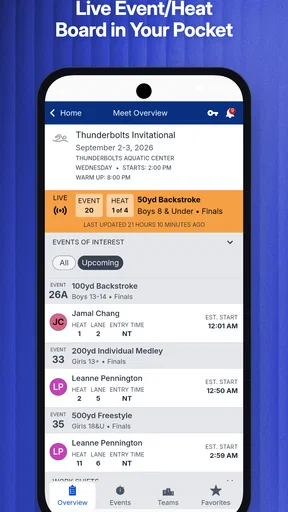
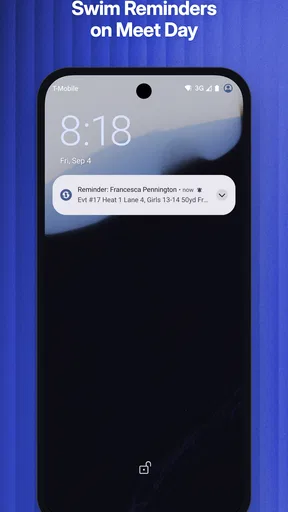
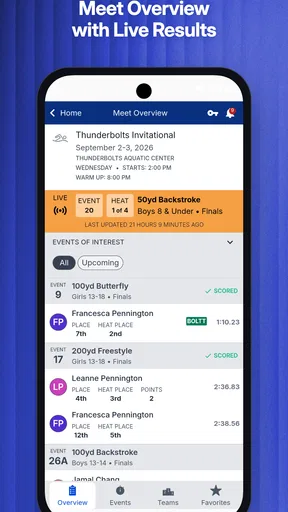
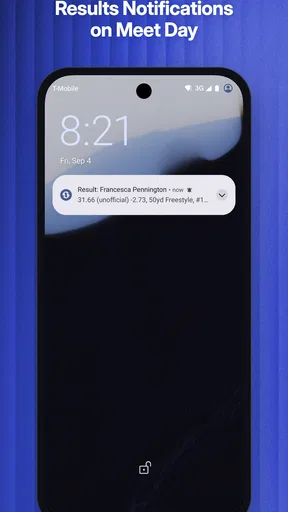
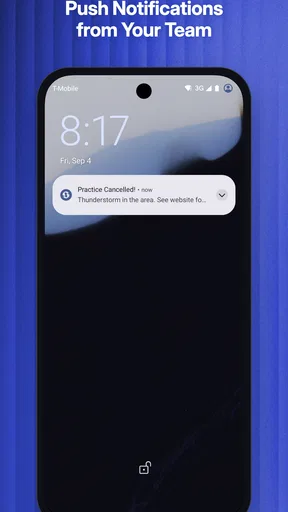
Our Review of SwimTopia
 Analysis by Appyee
Swim team information can become surprisingly difficult to manage once practices, meets, swimmers, families, and last-minute changes all start competing for attention. SwimTopia is a free sports app from Team Topia Inc. that brings those details into one place for people involved in swimming. I found its appeal less in flashy presentation and more in the way it can reduce the number of separate messages, notes, and calendar checks a swimmer or parent needs to make.
That focus matters. This is not a general fitness tracker, a technique coach, or a social network for every kind of athlete. It is designed around the practical information surrounding a swimmer, a swim team, and swim meets. If your team uses the service behind the app, it can become a useful daily reference. If you are looking for personal lap analysis or a broad training platform, you will probably find a different type of app more suitable.
How SwimTopia fits into a swimmer’s routine
My first impression is that the app makes most sense as a companion to an organized swimming program. Instead of treating swimming as a solo activity, it reflects the way the sport actually works for many families: a swimmer belongs to a team, the team attends events, and a lot of useful information needs to reach several people at once.
That makes the app especially relevant for parents who are tired of searching through long chat threads. A meet announcement may be easy to understand when it arrives, but the important details can become buried after several practice reminders and unrelated replies. Having team and meet information gathered in a dedicated place gives the information a clearer home.
I also think it can help swimmers who are old enough to manage some of their own schedule. Rather than asking a parent every time they need to check what is happening, they can open the app and look for the relevant team or event information themselves. That small change can make the routine feel more organized without requiring a complicated planning system.
The app has been available since July 2015, and its current version is 7.2.0. That long presence suggests a product built around an established use case rather than a short-lived experiment. It is rated 4.3 on average from over 700 ratings, with more than 180 written reviews, and it has passed 100K+ installs. Those figures do not guarantee that every team experience will be identical, but they do indicate that the app has found a real audience among swimming communities.
What the app is good at during an ordinary week
Imagine a parent checking the week’s swimming arrangements while getting ready for work. The useful question is not “What can this app do in theory?” but “Can I quickly find the information I need before leaving the house?” SwimTopia is strongest when used as that practical reference point. You can check team-related information, review upcoming meet details, and return to the same place instead of relying entirely on memory.
A swimmer may use it before practice to confirm the schedule, then check it again when a meet is approaching. A parent may use it to coordinate transport, decide whether a child needs to prepare for an event, and avoid asking the coach a question that has already been communicated. The value comes from repeated small moments, not from one dramatic feature.
One useful habit is to check the app at a fixed point in the day rather than opening it constantly. For example, a family could review it after dinner, confirm the next day’s arrangements, and then prepare towels, clothing, and travel plans. This turns the app into a predictable part of the routine and reduces the chance that a late change will be missed.
Another practical insight is that the app works best when the whole family agrees on where information should be checked first. If one person uses the app, another relies on text messages, and a third keeps a paper note, confusion can still happen. SwimTopia can simplify communication, but only when users treat it as the main reference for the team information it contains.
Speed expectations and the feeling of everyday use
For an app like this, perceived speed is mostly about how quickly I can get to a schedule or meet detail. I do not need elaborate animation or a visually rich interface. I want the important information to appear without making me navigate through unnecessary screens. SwimTopia’s purpose favors that practical kind of responsiveness.
In normal use, I would judge the app by three simple questions: does it open without fuss, can I reach the information I need with a few deliberate taps, and does it remain understandable when I am checking it in a hurry? That is a more useful performance test here than comparing it with an action game or a video editor. A sports information app should feel calm and direct.
The app’s age rating is Everyone, which fits its family-oriented role. That does not mean every user will find every screen equally intuitive. A parent managing several commitments may appreciate the structure, while someone opening it for the first time might need a little time to understand how their team’s information is organized. The learning curve is likely to come from the team context rather than from advanced technical controls.
I would also avoid expecting instant results when the information depends on a team’s own activity. An app can display information efficiently, but it cannot make a coach, organizer, or parent publish an update earlier. This is an important distinction: a slow-feeling experience may sometimes be caused by waiting for new team information, not by the app itself.
What happens during heavy-use moments
The most demanding moments are likely to occur around swim meets. That is when many people may be checking details close together, and when a small delay or unclear update can create real frustration. A swimmer may be preparing equipment, a parent may be planning travel, and several family members may be trying to understand the same event from different perspectives.
This is where I see the app’s main practical test. It needs to remain easy to consult when the user is distracted, moving between locations, or dealing with a crowded schedule. A complicated workflow would be especially unwelcome at a meet, because nobody wants to spend valuable preparation time searching through a maze of screens.
My advice is to review important information before leaving home rather than waiting until arrival. That is not a criticism of SwimTopia; it is a sensible workflow for any event-focused app. Checking early gives you time to notice a detail that needs clarification, prepare the swimmer properly, and avoid treating the phone as the only source of memory during a busy day.
A second useful habit is to make sure the app is ready before a high-pressure moment. Open it earlier, confirm that you are looking at the correct team or event context, and keep your phone sufficiently charged. These steps sound basic, but they matter more than theoretical performance when you are standing beside a pool and trying to help a child get ready.
The trade-off is that an app centered on team information may feel quiet between events. That is not necessarily wasted space. It means the product is not constantly trying to occupy your attention with unrelated content. For families who want a focused utility, that restraint is helpful. For users expecting an always-active training dashboard, it may feel limited.
Reliability, updates, and communication habits
Reliability here has two layers. The first is whether the application behaves consistently on the phone. The second is whether the information presented is current and relevant to the team. Those are separate concerns, and it is important not to confuse them.
SwimTopia can be a dependable place to look, but users still need to understand that organized sports involve changing plans. A meet schedule can evolve, an event can be adjusted, or a family’s own arrangements can change. I would use the app as a central reference while still paying attention to direct communication from the team when something is urgent or unusual.
One of the better workflows is to use the app for structured information and personal notes for individual logistics. The app can help you see the team or meet context, while a separate reminder can handle details such as leaving time, equipment to pack, or who is driving. This division keeps the app focused and prevents it from becoming a substitute for every planning tool on your phone.
Another non-obvious point is that reliability improves when users avoid making assumptions from old information. If you are returning to a screen after several days, take a moment to confirm that you are viewing the relevant upcoming activity rather than relying on what you remember seeing previously. That is particularly important during a busy meet period.
The developer, Team Topia Inc., has kept the app in active versioned form, with 7.2.0 listed as the current version. I see that as a positive sign for maintenance, although an update number alone cannot tell me how every device or team setup will behave. The strongest evidence for reliability will always be how smoothly it fits your own team’s communication habits.
Device constraints and resource expectations
The app is free to download and use, with optional in-app purchases listed from $1.99 to $14.99 per item. That makes it easy to try without committing to an upfront purchase, but I would still pay attention to any purchase prompts and understand which parts are relevant to your team before spending money. A free entry point is useful, especially for families who may only need the app during a particular swimming season.
It requires Android 6.0 or later. On a compatible phone, I would expect the basic demands of a team-information app to be more modest than those of a game, streaming service, or video editor. It is not the sort of product I would install for visual spectacle, so storage and battery expectations should be relatively reasonable in ordinary use. Still, the exact experience can vary with the phone, operating system condition, connection quality, and how heavily the app is used.
If you are using an older compatible device, the sensible approach is to keep expectations practical. You may not care about advanced graphics, but you will care about clear loading and readable information. Close unrelated apps if the phone is already struggling, keep the operating system in good condition, and avoid testing the app for the first time while rushing to a meet.
People who use iPhones should also check the appropriate version for their device before planning around it. The important question is not simply whether the app exists for a platform, but whether your particular phone can run the current experience comfortably. Families often share information across different devices, so agreeing on the same checking routine is more valuable than expecting every handset to behave identically.
One limitation is that a team-focused app is not a complete replacement for a phone’s calendar, reminders, or messaging tools. If you want automatic personal planning across school, work, travel, and several sports, a general calendar may still be better. SwimTopia is more specialized: its strength is keeping swimming information connected to the team and meet context.
Who will benefit most from it
I would recommend SwimTopia first to parents of competitive or organized swimmers who need a clearer way to follow team activity. It is also a good fit for swimmers who are becoming more independent and want direct access to information instead of depending on a parent to repeat it.
It can be especially useful in households with more than one swimmer. Even without turning the app into a full family planner, having a shared team-oriented reference can reduce the mental load of remembering which child is connected to which activity. The benefit grows when the family uses a consistent routine for checking information before practices and meets.
Coaches and team organizers may also find the concept useful because the app is built around communicating swimming information rather than around individual exercise statistics. However, the value for them depends on how well the team adopts the system. An app cannot solve fragmented communication if important updates continue to appear in several unrelated places.
I would skip it if you swim casually on your own and do not belong to a team or attend organized meets. In that situation, a lap counter, workout planner, technique library, or general fitness tracker would probably offer more relevant tools. I would also look elsewhere if your main goal is detailed personal performance analysis, because this app’s identity is administrative and team-centered rather than training-metric-centered.
How it compares with the usual alternatives
The most common alternative is a mixture of group chats, email, paper notices, and a phone calendar. That combination can work, but it spreads information across places and makes older messages harder to find. SwimTopia’s advantage is specialization: it gives swimming-related information a dedicated home instead of asking families to reconstruct the schedule from conversations.
A general calendar remains better for personal time management. It can combine swimming with school, appointments, work shifts, and travel in one timeline. I would not abandon that tool entirely. Instead, I would use the swimming app for team and meet context, then add only the most important personal commitments to the calendar.
A fitness tracker is a different comparison altogether. It may be stronger for recording workouts, monitoring activity, or reviewing personal trends, but it does not necessarily solve the communication problem around a team. SwimTopia is more useful when the question is “What do I need to know about this swimming activity?” rather than “How did my body perform during the session?”
Messaging apps are faster for urgent conversation, but they are often poor archives. A long thread can contain useful details, yet finding one particular meet item later may take too much effort. The dedicated app is better for structured reference, while messaging remains valuable when a quick question needs a direct answer. In my view, the best setup is not choosing one tool for everything; it is giving each tool a clear job.
Small habits that make the app more useful
First, I would check it at two deliberate points: once when planning the week and again before a meet or other important team activity. This avoids both extremes—forgetting to look until the last minute and repeatedly opening the app without a clear purpose.
Second, I would prepare around the information rather than merely reading it. If a meet is approaching, use what you see to decide when to leave, what to pack, and what questions need answering. The app becomes more valuable when it changes your preparation, not when it is treated as another notification source.
Third, I would teach younger swimmers how to find their own information. A parent can still supervise, but sharing the checking routine helps the swimmer take responsibility. This is a particularly good use case because the app’s team focus naturally connects information with real-world action.
Finally, I would keep a backup plan for urgent details. That could mean knowing where the team’s direct communication channel is or saving an important instruction separately. This is not because SwimTopia is unsuitable; it is because busy sporting events are easier when one technical issue does not leave the whole family uncertain.
My performance verdict
SwimTopia feels best understood as a focused sports utility rather than a demanding all-purpose platform. Its performance value comes from helping users reach swimming information without adding another complicated layer to an already busy schedule. I would expect it to be most comfortable during routine checks and most valuable around meets, where organized information can save time and reduce repeated questions.
Its limitations are equally clear. It will not replace a personal calendar, direct communication, or a training-analysis app. Its usefulness depends on the team using the surrounding service consistently, and users should still prepare for changing plans instead of assuming that one screen contains every answer.
With a 4.3 average, more than 100K+ installs, an Everyone rating, and a free starting price, it is easy for a swimming family to try without much risk. The optional purchases, ranging from $1.99 to $14.99 per item, are worth considering before committing to anything beyond basic use. For Android users, compatibility begins at Android 6.0, which keeps the app accessible to many older phones while still making device condition relevant.
My recommendation is simple: if your child belongs to a swim team or your own swimming life revolves around organized meets, give it a fair trial and build it into your weekly routine. If you only want workout tracking or solo swimming guidance, choose a tool designed for that purpose instead. The app is most successful when it turns scattered team information into a reliable habit of checking, preparing, and showing up ready.
Verdict
Strengths of SwimTopia
- Makes meet registration and swimmer entries easier for families.
- Provides timely updates about schedules, events, and team activities.
- Useful team communication tools keep parents and swimmers informed.
- Supports volunteer coordination for swim meet responsibilities.
- Helps organize swimmer results and season performance records.
Limitations of SwimTopia
- Some features may require an invitation from a participating swim team.
- The interface can feel crowded when many team tools are enabled.
- Notifications may become excessive during busy meet periods.
- Limited usefulness outside teams that use the SwimTopia platform.
- Certain actions may depend on administrator settings or team permissions.
Similar Picks in This Category
View All
BeSoccer: Soccer Live Score
BeSoccer apps4.3

Cricbuzz - Live Cricket Scores
Cricbuzz.com3.7

NFL
NFL Enterprises LLC2.4

Da Fit
MO YOUNG LIMITED3.6

ESPN
Disney4.5

LiveScore: Live Sports Scores
LiveScore Limited4.5
Frequently Asked Questions
What is SwimTopia, and who is the app designed for?
SwimTopia is a swim-team management app designed for swimmers, parents, coaches, team administrators, and volunteers. It brings schedules, meet information, swimmer entries, results, announcements, volunteer assignments, and team communication into one place. The exact features available can vary depending on whether your swim club has an active SwimTopia account and how administrators configure the team website and mobile experience.
Can I use SwimTopia without joining a swim team?
Most of SwimTopia’s useful features depend on being connected to a participating swim team or club. You may be able to browse publicly available team information without an account, but private schedules, swimmer details, meet entries, results, payments, and volunteer tasks generally require an invitation or membership connection. Before downloading, confirm that your team uses SwimTopia and that you have the correct email address associated with your family profile.
What can parents and swimmers do with SwimTopia?
Parents and swimmers can use SwimTopia to review practice and meet schedules, check event entries, follow heat and lane information when available, view results, receive team announcements, and manage volunteer commitments. Depending on the team’s setup, families may also update contact information, respond to meet availability requests, and access important club resources. Some functions may appear only during the active swim season.
Does SwimTopia support swim meet registration and live results?
SwimTopia can help teams organize meet participation, including availability requests, swimmer entries, event information, and results. Some meets may provide live or rapidly updated information, while others may display results only after administrators upload or publish them. The timing and level of detail depend on the meet software, team settings, internet connection, and how quickly officials or administrators enter the data.
Is SwimTopia free to download, and are there any limitations?
The SwimTopia app is generally available to download without an upfront purchase, but access to specific features is tied to your team’s subscription, configuration, and membership permissions. Certain functions may require an account or invitation, and some teams may handle fees, registrations, or payments through separate processes. Review your club’s instructions and check the app store listing for current device requirements and availability.
